An introductory lesson to Ophcrack. This lesson covers the basics of rainbow tables, how to install them, using them to crack unsalted LM and NTLM hashes.
Prerequisites
PC1010 - Intro to Password Cracking
Optional: Torrent (for downloading all the rainbow tables at once)
Disclaimer
The content of this course is for educational use only. I do not condone the use of information from this post for illegal or unethical purposes. Use this information only with explicit permission from the owner of the data. Don’t be a Script Kiddie
Topics Covered
- What is Ophcrack?
- What Are Rainbow Tables?
- Navigating Ophcrack
- Cracking Windows Hashes
- Why Rainbow Tables Fail Against Modern Systems
What is OphCrack?
From kali.org
“Ophcrack is a Windows password cracker based on a time-memory trade-off using rainbow tables. This is a new variant of Hellman’s original trade-off, with better performance. It recovers 99.9% of alphanumeric passwords in seconds.”
Ophcrack is primarily used on older LM and NTLM hashes (Windows Vista, XP, and 7), therefore it is not extremely relevant today.
Installing Ophcrack
Debian/Ubuntu/Kali: sudo apt install ophcrack
Arch: sudo pacman -S ophcrack
Brew: brew install ophcrack
What are Rainbow Tables?
Rainbow tables are precomputed tables of hashes that can be used to reverse hash functions. Instead of hashing a wordlist and then comparing the hash, the passwords are already solved for. Imagine having a really large spreadsheet of password-hash combinations that you can CTRL-F. The tradeoff for rainbow tables’ speed comes in storage, in which larger tables can take up terabytes of space.
Downloading Rainbow Tables
The best place to get rainbow tables is from Ophcrack’s website. The larger tables require torrent, but this course will only use Vista Proba Free
Using Ophcrack
Using Ophcrack comes down to 4 steps
- Installing the rainbow tables
- Acquiring hashes
- Loading the hashes
- Cracking the hashes
Using Ophcrack - Installing the Rainbow Tables
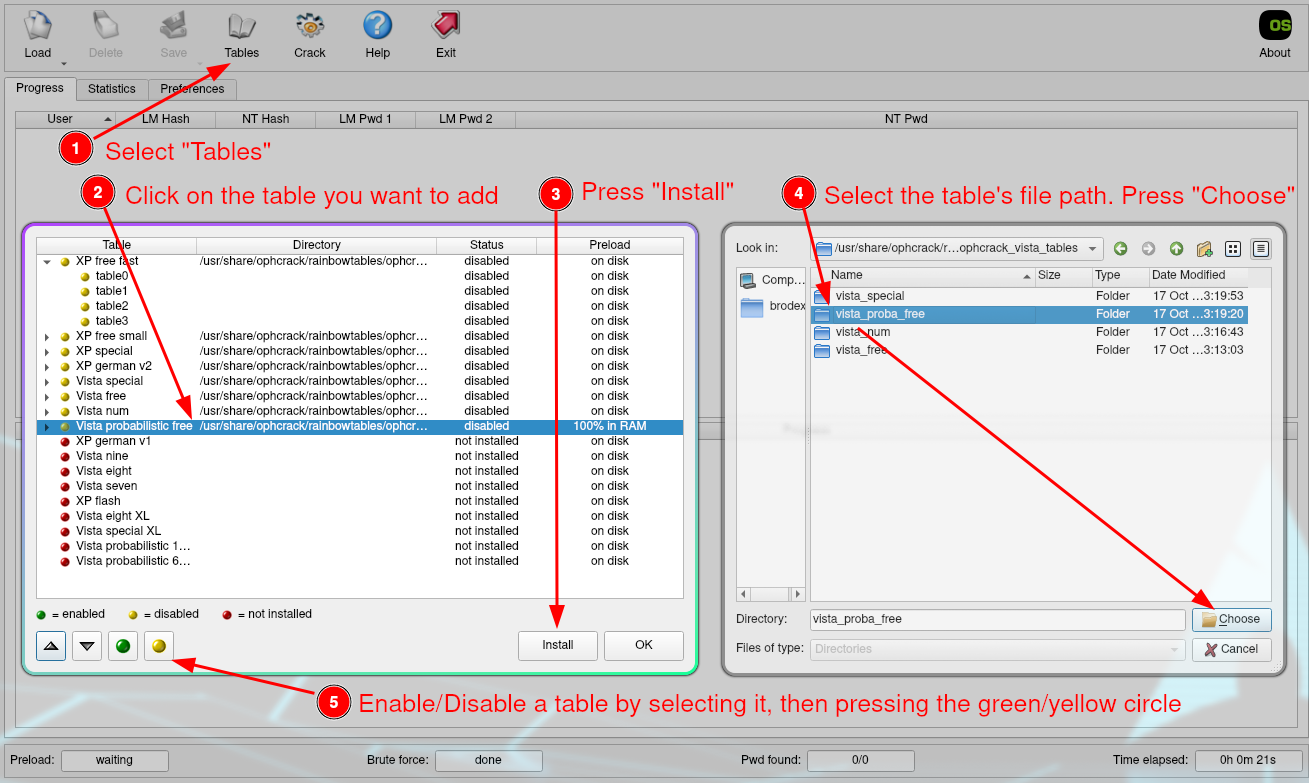
- Select the “Tables” button at the top of the screen
- Select the table you want to add
- Press install
- Define the filepath of the table directory, then press “Choose”
- The circle next to the table should turn green. If it doesn’t, highlight the table, then press the green “Enable” circle
Using Ophcrack - Acquiring Hashes
We will not be covering acquiring NT, LM, and NTLM hashes in this lesson, but they can be found through:
- SAM databases
- NTLM hash generators
For this lesson, use these hashes acquired from a PWDUMP file:
admin:1000:aad3b435b51404eeaad3b435b51404ee:58a478135a93ac3bf058a5ea0e8fdb71:::
sales:1001:aad3b435b51404eeaad3b435b51404ee:e6f80a6cbf0607a00ad93f85542c2802:::
intern:1002:aad3b435b51404eeaad3b435b51404ee:a3a685f89364d4a5182b028fbe79ac38:::
analyst:1003:aad3b435b51404eeaad3b435b51404ee:78282df43299d748e53ea745932e5fd0:::
backup:1004:aad3b435b51404eeaad3b435b51404ee:becedb42ec3c5c7f965255338be4453c:::
Using Ophcrack - Load the Hashes
- Select “Load” at the top of the screen
- Select one of the 4 options:
- Single Hash - Just one Hash
- PWDUMP file - A collection of Hashes
- Session file - Load a previous session
- Encrypted SAM - Extracted from Windows SAM database
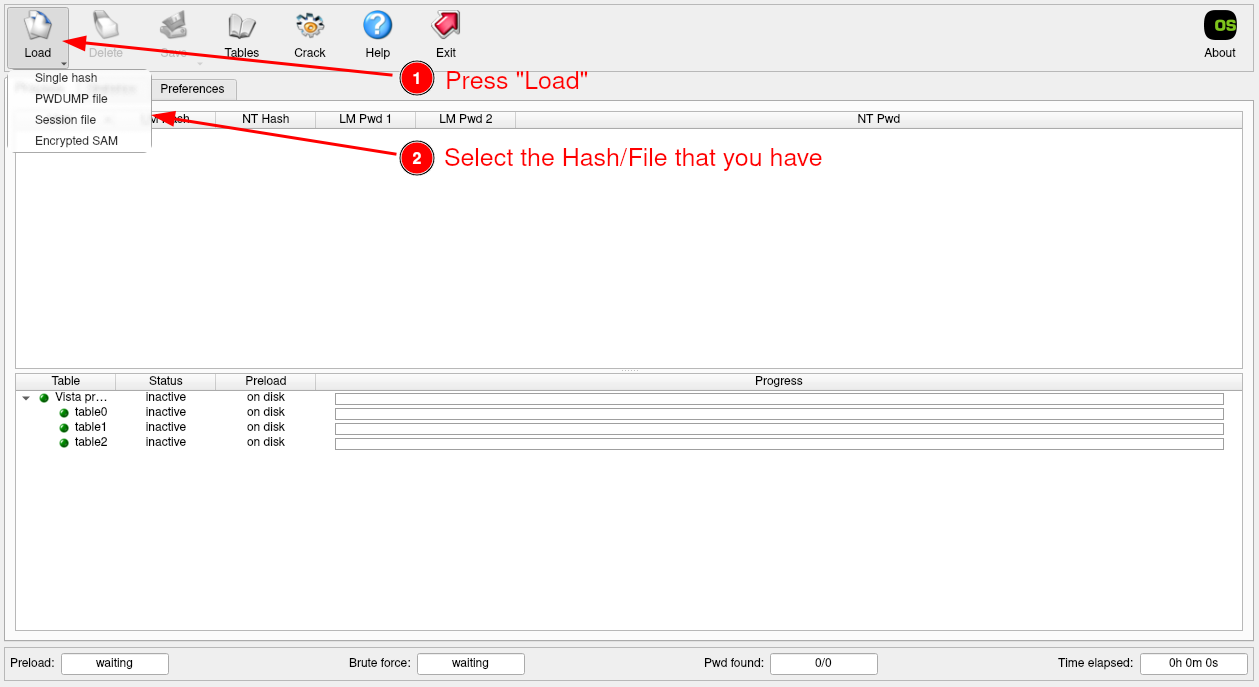
- Either paste the single hash or choose the directory of the file
- Press “Open” or “OK”
- All the Hashes should populate the screen
Using Ophcrack - Crack Hashes
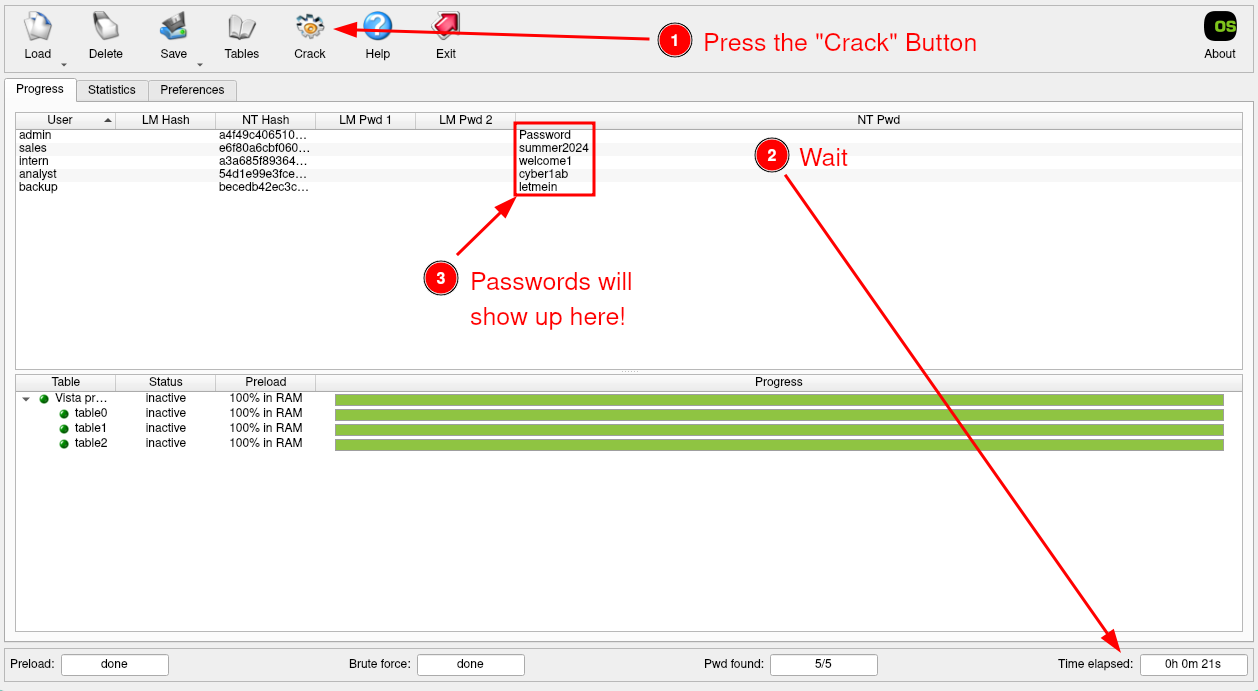
- Press the “Crack” button at the top of the screen
- Wait
- Congrats! You should now have some passwords!